Text Message Troubleshooting
What if an adorer isn't receiving text messages?
If an adorer reports not receiving text messages from the We Adore Him phone number, please review these troubleshooting steps.
- Confirm that their phone can receive text messages. Some phones (like landlines) cannot receive text messages. For example, send them a text message from your mobile phone.
- Ensure the adorer account exists at Admin » Adorers, has the correct phone number, and is opted in to receive text messages.
- Review the adorer's text message history at Admin » Text Messages and that each message shows a status of Delivered. If a message shows Failed, the Failure filter reveals whether the adorer's phone is unable to receive texts or a carrier or network issue was to blame. Learn more.
- Check if the phone number has been blocked. Open the text message conversation for the adorer at Admin » Text Messages. If the phone number is blocked, click Unblock Phone Number to resume sending messages. You can also hover over the alert icon beside the phone number and click Unblock (see below).
- Ask the adorer to text the word START to the We Adore Him phone number, which signals to their phone carrier that they want to opt-in to receive messages from the adoration website. They should receive a confirmation message back.
- Ask the adorer to check if their phone is blocking the We Adore Him phone number. Here are instructions for unblocking a phone number on Apple and Android phones. You might also review these troubleshooting steps for Apple phones.
Finding Suppressed Phone Numbers
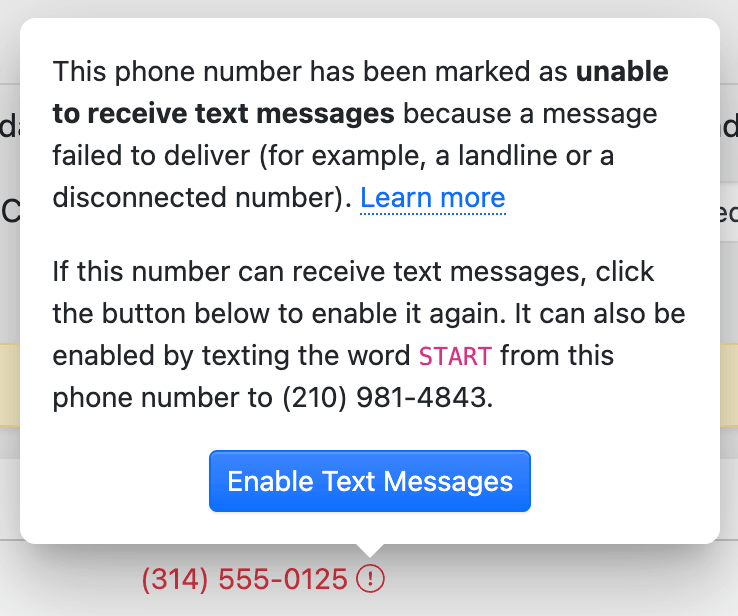
A phone number is suppressed when it has been blocked, or marked as unable to receive text messages because a message failed to deliver (for example, a landline or a disconnected number). Suppressed numbers are displayed in red with an alert icon wherever they appear. Hover over the icon to see what happened.
Find all suppressed phone numbers at Admin » Adorers by clicking the Phone filter and selecting Has a suppressed phone number.
Enabling Text Messages Again
If the number can receive text messages, hover over the alert icon and click Enable Text Messages. A blocked number offers Unblock instead. Messages resume immediately.
Please note: Adorers can enable text messages for their own phone number on their Dashboard, or by texting START from that phone.
Send them the welcome text message as a test.
Please contact us if you continue experiencing issues delivering a text message to an adorer's phone.