Generic Substitute Requests
Are substitute requests created automatically for hours with no commitments?
We Adore Him does not automatically start substitute requests for hours with no commitments. Hours without commitments need adorers to make commitments until the schedule is filled.
However, while a chapel is still working to fill up its schedule with committed adorers, it can be helpful to find a "substitute" for these hours with the automated Substitute Finder.
This feature can be abused. If too many substitute requests are created early in adopting We Adore Him at your parish, it can quickly become spammy, and people may ignore future substitute requests or opt out altogether.
Creating a Generic Substitute Request
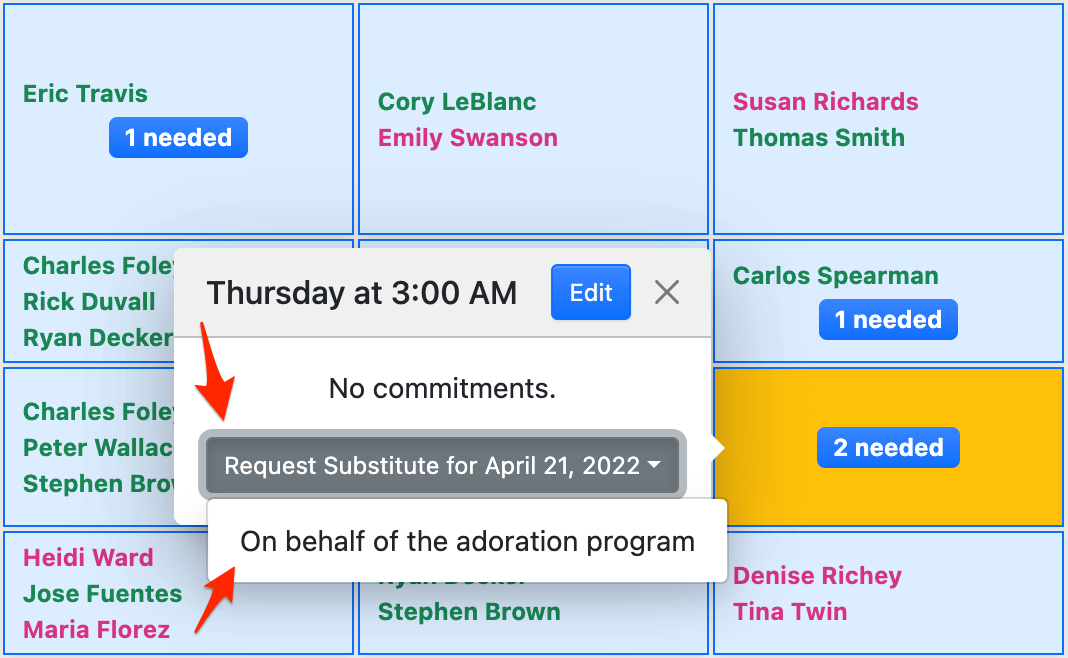
Administrators and captains can create "generic" substitute requests:
- Hover over an hour on the Calendar page.
- Click Request Substitute for [date].
- Click On behalf of the adoration program.
Choosing a Start Time and Duration
If your chapel allows additional commitment start times and durations, a generic substitute request can cover part of an hour by choosing a custom Start time and Duration.
These choices appear when the Enable additional commitment start times and durations field is turned on at Admin » Settings » Commitments. Otherwise, a generic substitute request covers one hour, starting at the top of the hour.
Claiming a Generic Substitute Request
A generic substitute request can be claimed like any other. When an adorer makes an adoration commitment covering the date and time of an open substitute request, that substitute request is claimed automatically, though adorer substitute requests take priority over generic substitute requests.
Listing All Generic Substitute Requests
To view all substitute requests created this way, visit Admin » Substitute Requests and set the Requested by filter to Administrators and Captains.