Your chapel's We Adore Him email address sends incoming emails to your forwarding email address. But sometimes, unwanted or suspicious emails slip through from addresses that don't belong to any of your adorers.
Several coordinators asked for a way to stop these emails, and today we're happy to introduce email address blocking. 🛡️
You can now block specific email addresses from the Admin » Emails page. The easiest way to find suspicious senders is to filter the list to show Adorer = Unknown, which displays emails from addresses that don't match any adorer in your system. From there, simply click the Block button next to any address you'd like to block.
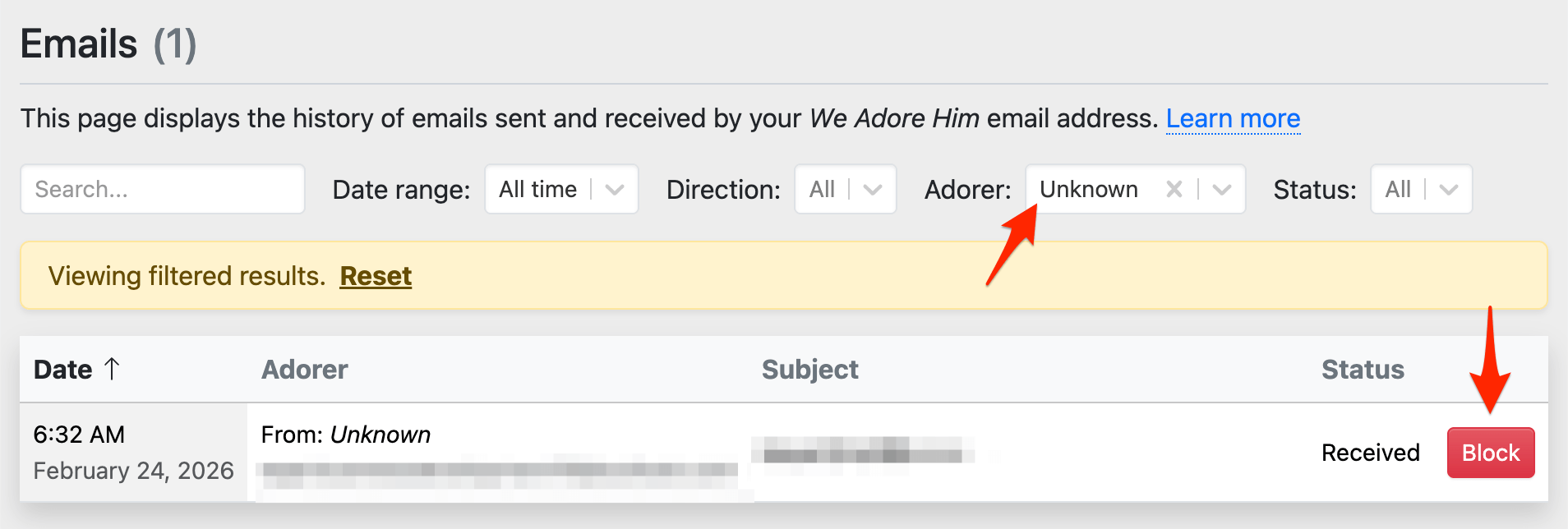
Once an email address is blocked, all future incoming emails from that address will be silently ignored — they won't be forwarded to your forwarding email address.
If you ever block an email address by mistake, you can unblock it from the same page.
If you've used phone number blocking before, this works the same way — now you have full control over both email and phone communications. We hope this gives you peace of mind and keeps your inbox clean! 💪