Sort Name Field
How can I get a list of the first and last names of all adorers?
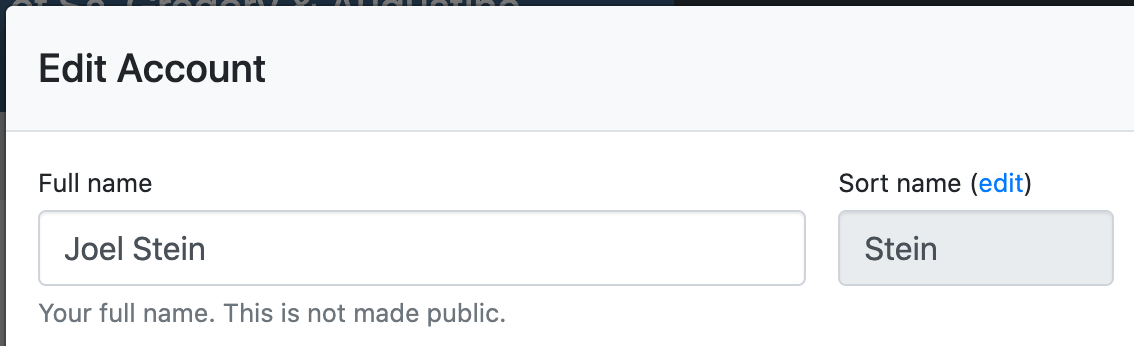
We Adore Him uses a single Name field for each adorer. It is the name shown throughout the site, and the one they can log in with.
The Sort Name Field
Alongside it, every adorer has a Sort name field, which decides where they fall alphabetically in lists. It is prepopulated with the adorer's last name, and you can change it whenever that guess is wrong.
Building a List of First and Last Names
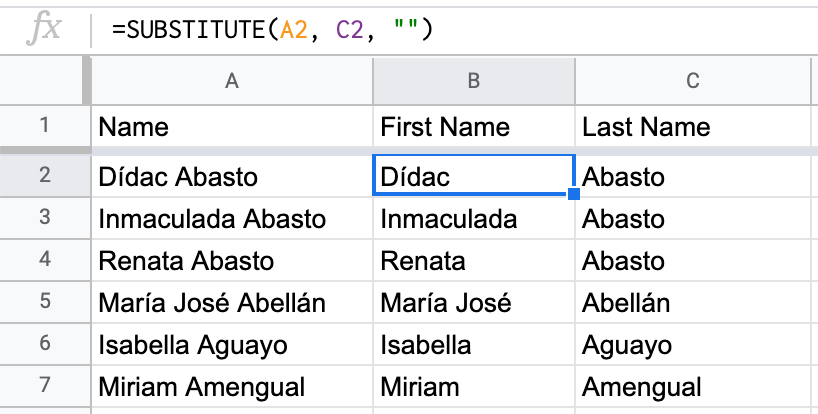
Because there is only one name field, first and last names are not stored separately. You can separate them in a spreadsheet, using the Sort name as the last name.
-
Export your adorer list at Admin » Adorers.
-
Open the downloaded file in a spreadsheet program (e.g., Microsoft Excel, Apple Numbers, Google Sheets).
-
Add a new column between Name and Sort Name called First Name.
-
In this column, use the following formula: =SUBSTITUTE(A2, C2, "")
-
Finally, rename Sort Name to Last Name.
Now you should have columns containing the full name, first name, and last name of each of your adorers.